Harvesting in Ceres
Harvesting Architecture
Section titled “Harvesting Architecture”Ceres is organized around harvesting first.
The primary job of the system is to pull dataset metadata from portal APIs, normalize it, and keep a local catalog synchronized over time. Embeddings are a separate stage that can run later through Ollama or a hosted provider.
Today the shipping portal clients cover:
- CKAN portals
- DCAT-AP portals that expose the udata REST JSON-LD catalog
- SPARQL-backed DCAT catalogs (via
--profile sparql, e.g.data.europa.eu) - Static Project Open Data / DCAT-US catalogs (via
--profile static_json) - Socrata catalogs through the Discovery API (via
--type socrata) - OpenDataSoft catalogs through the Explore API v2.1 (via
--type opendatasoft) - ArcGIS Hub catalogs through the Hub Search API (via
--type arcgis) - OGC CSW 2.0.2 catalogues (via
--type ogc_records) - STAC APIs at Collection granularity (via
--type stac) - SDMX REST services at dataflow granularity (via
--type sdmx)
OGC catalogues are capability-driven: Ceres reads GetCapabilities, follows
the advertised record bindings, and streams bounded result windows. A window
that fails is retried at a smaller size (100 → 25 → 5 → 1) before a single
unreadable record is skipped, so one record a catalogue cannot serve costs that
record rather than every record after it. Any skip makes the final result
partial, preventing stale marking and incremental-sync advancement while the
later readable records remain saved. Configure
ogc_endpoint when the CSW service differs from the logical portal URL.
STAC harvesting is link-driven: Ceres reads the API landing page, verifies
STAC conformance, follows its rel=data Collections link, and follows
rel=next page links. Each Collection becomes one series record with its
complete JSON preserved. Item links are never followed, preventing accidental
scene-level catalog expansion.
See Supported portals for per-portal configuration, examples, and current coverage numbers.
Opt-in live smoke tests
Section titled “Opt-in live smoke tests”Every shipping client has a deterministic, offline unit/parser suite that runs
in normal CI, plus at least one live smoke test that talks to a real portal.
The live smokes are marked #[ignore], so ordinary cargo test and CI never
run them and never depend on a network. They are metadata-only and never
require embedding credentials.
Run every family’s smoke at once (this matches every #[ignore] test with
smoke in its name, including the extra checks noted below the table):
cargo test -p ceres-client -- --ignored smokeOr run one family. Most tests read a CERES_*_SMOKE_URL override so you can
point them at any portal of that family; the exceptions are noted in the table:
| Profile | Smoke test | Portal override | Default portal |
|---|---|---|---|
| CKAN | ckan::tests::ckan_smoke_catalog |
CERES_CKAN_SMOKE_URL |
ckan.a2gov.org |
| DCAT udata REST | dcat::tests::test_dcat_smoke_luxembourg |
CERES_DCAT_SMOKE_URL |
data.public.lu |
| DCAT SPARQL | sparql::tests::test_sparql_smoke_europa |
CERES_SPARQL_SMOKE_URL |
data.europa.eu |
| Project Open Data | datajson::tests::data_json_smoke_catalog |
CERES_DATAJSON_SMOKE_URL |
www.data.va.gov/data.json |
| Socrata | socrata::tests::socrata_smoke_catalog |
CERES_SOCRATA_SMOKE_URL |
data.cityofnewyork.us |
| OpenDataSoft | opendatasoft::tests::opendatasoft_smoke_catalog |
CERES_ODS_SMOKE_URL |
opendata.paris.fr |
| ArcGIS Hub | arcgis::tests::arcgis_smoke_catalog |
CERES_ARCGIS_SMOKE_URL |
opendata.dc.gov |
| OGC CSW | ogc_records::tests::emodnet_csw_smoke |
— (endpoint hard-coded) | EMODnet GeoNetwork |
| STAC | stac::tests::copernicus_stac_smoke |
CERES_STAC_COPERNICUS_URL |
stac.dataspace.copernicus.eu |
| SDMX | sdmx::tests::sdmx_smoke_catalog |
CERES_SDMX_SMOKE_URL |
data.norges-bank.no |
| OGC CSW (Dublin Core) | ogc_records::tests::rndt_dublin_core_smoke |
CERES_CSW_DUBLIN_CORE_SMOKE_URL |
geodati.gov.it/RNDT/CSW |
Some families ship a second #[ignore] smoke that the run-all command also
picks up: ArcGIS adds arcgis_rejects_global_scope_smoke (a negative-path
check that a known empty-scope Hub is rejected), OGC CSW adds
copernicus_marine_csw_smoke (endpoint hard-coded), STAC adds
canada_datacube_stac_smoke (CERES_STAC_CANADA_URL override), and SDMX adds
eurostat_sdmx_smoke (CERES_SDMX_EUROSTAT_URL override), which reads the
largest structure message in the family.
# Single family, exact test namecargo test -p ceres-client ckan::tests::ckan_smoke_catalog -- --ignored --exact
# Same test against a different CKAN portalCERES_CKAN_SMOKE_URL=https://data.stadt-zuerich.ch \  cargo test -p ceres-client ckan::tests::ckan_smoke_catalog -- --ignored --exact
Skip conditions and rules:
- The default
data.europa.euSPARQL smoke is a scale endpoint (millions of records). For routine validation pointCERES_SPARQL_SMOKE_URLat a smaller national catalogue (for examplehttps://data.slovensko.sk). - A smoke test failure means today’s portal contract changed or the portal is down. It never fails normal CI because the tests are ignored by default; treat a red smoke as a signal to investigate the portal, not a broken build.
- Optional API tokens (
SOCRATA_APP_TOKEN,ODS_API_KEY) only raise rate limits — the smokes read public data without them.
Beyond the client smokes, a full metadata-only harvest of any configured portal is the strongest live check:
# Dry run first: exercises the client without writing to the databaseceres harvest --config examples/portals.toml --portal ann-arbor --metadata-only --dry-run
# Then a real metadata-only harvestceres harvest --config examples/portals.toml --portal ann-arbor --metadata-only
Socrata Discovery API
Section titled “Socrata Discovery API”Socrata portals are harvested from their paginated /api/catalog/v1 endpoint,
scoped to the portal hostname and limited to dataset assets. Ceres streams one
page at a time, preserves each complete Discovery result in metadata, and
uses updatedAt ordering for incremental synchronization. HTML descriptions
are converted to plain text for search and embedding while the original HTML
remains available in the raw metadata.
Public read-only harvests require no credentials. Set SOCRATA_APP_TOKEN to
send an optional X-App-Token header and receive higher rate limits:
SOCRATA_APP_TOKEN=... ceres harvest https://data.cityofnewyork.us \ --type socrata --metadata-onlyRun the ignored live smoke check against NYC or another public portal:
CERES_SOCRATA_SMOKE_URL=https://data.cityofnewyork.us \ cargo test -p ceres-client socrata_smoke_catalog -- --ignored --nocaptureOpenDataSoft Explore API
Section titled “OpenDataSoft Explore API”OpenDataSoft portals are harvested from their paginated
/api/explore/v2.1/catalog/datasets endpoint. Ceres streams one page at a
time (100 datasets per page, the API maximum) and preserves each complete
catalog entry — including the fields schema hints — in metadata. Titles,
descriptions, themes, keywords, license, publisher, and the modified
timestamp are normalized from metas.default; HTML descriptions are converted
to plain text for search and embedding while the original HTML remains in the
raw metadata.
The Explore API rejects requests where limit + offset reaches 10,000. Small
catalogs are walked with plain offset pagination; deeper catalogs (such as the
data.opendatasoft.com federation hub, ~94k datasets) are walked newest-first
with a keyset cursor on the modified timestamp, followed by a final sweep
for datasets without one. Incremental sync filters server-side with
where=modified >= date'...' and falls back to a full sync when more datasets
changed than the pagination window can reach.
Public read-only harvests require no credentials. Set ODS_API_KEY to send an
Authorization: Apikey ... header and receive higher quotas:
ODS_API_KEY=... ceres harvest https://opendata.paris.fr \ --type opendatasoft --metadata-onlyRun the ignored live smoke check against Paris or another public portal:
CERES_ODS_SMOKE_URL=https://opendata.paris.fr \ cargo test -p ceres-client opendatasoft_smoke_catalog -- --ignored --nocaptureDCAT profiles
Section titled “DCAT profiles”Portals with type = "dcat" select their transport through an explicit profile
(the DcatProfile enum in ceres-core). The same names are accepted everywhere
a profile can be specified: portals.toml (profile = "..."), the CLI
(--profile ...), and REST harvest jobs.
| Profile | Aliases | Client | Notes |
|---|---|---|---|
udata_rest |
udata |
udata REST JSON-LD catalog | Default when omitted |
sparql |
— | SPARQL endpoint (DCAT-AP) | Endpoint defaults to {url}/sparql; override with sparql_endpoint |
static_json |
data_json |
Project Open Data / DCAT-US data.json |
URL may be the site root or the JSON document |
Every profile preserves full source metadata. Validation is enforced at config load and at client creation:
profileis only valid ontype = "dcat"portalssparql_endpointis only valid withprofile = "sparql"- unknown profile names are rejected with the list of supported values
Static catalogs are downloaded with a hard 256 MiB response limit because the
format is normally one JSON document without server-side pagination. Override
the ceiling with CERES_STATIC_JSON_MAX_BYTES when a trusted catalog is larger.
The complete source dataset object, including distributions, is preserved in
metadata; incremental runs filter the catalog locally using modified.
ceres harvest https://www.data.va.gov/data.json \ --type dcat --profile static_json --metadata-onlyVerified public catalogs (live smoke-tested 2026-07-10):
| Portal | URL | Usable datasets observed |
|---|---|---|
| US Department of Veterans Affairs | https://www.data.va.gov/data.json |
1,965 |
| US Department of Energy | https://www.energy.gov/data.json |
483 |
| US Census Bureau | https://www.census.gov/data.json |
1,790 |
| US Department of Justice | https://www.justice.gov/data.json |
3,273 |
Run the opt-in parser/network smoke check against any candidate URL:
CERES_DATAJSON_SMOKE_URL=https://www.energy.gov/data.json \ cargo test -p ceres-client data_json_smoke_catalog -- --ignored --nocaptureCore pipeline
Section titled “Core pipeline”Portal API -> PortalClient -> HarvestService -> DatasetStore | +-> sync history +-> stale detection +-> pending embeddings
DatasetStore (pending) -> EmbeddingService -> vectors for searchTwo-Tier Optimization
Section titled “Two-Tier Optimization”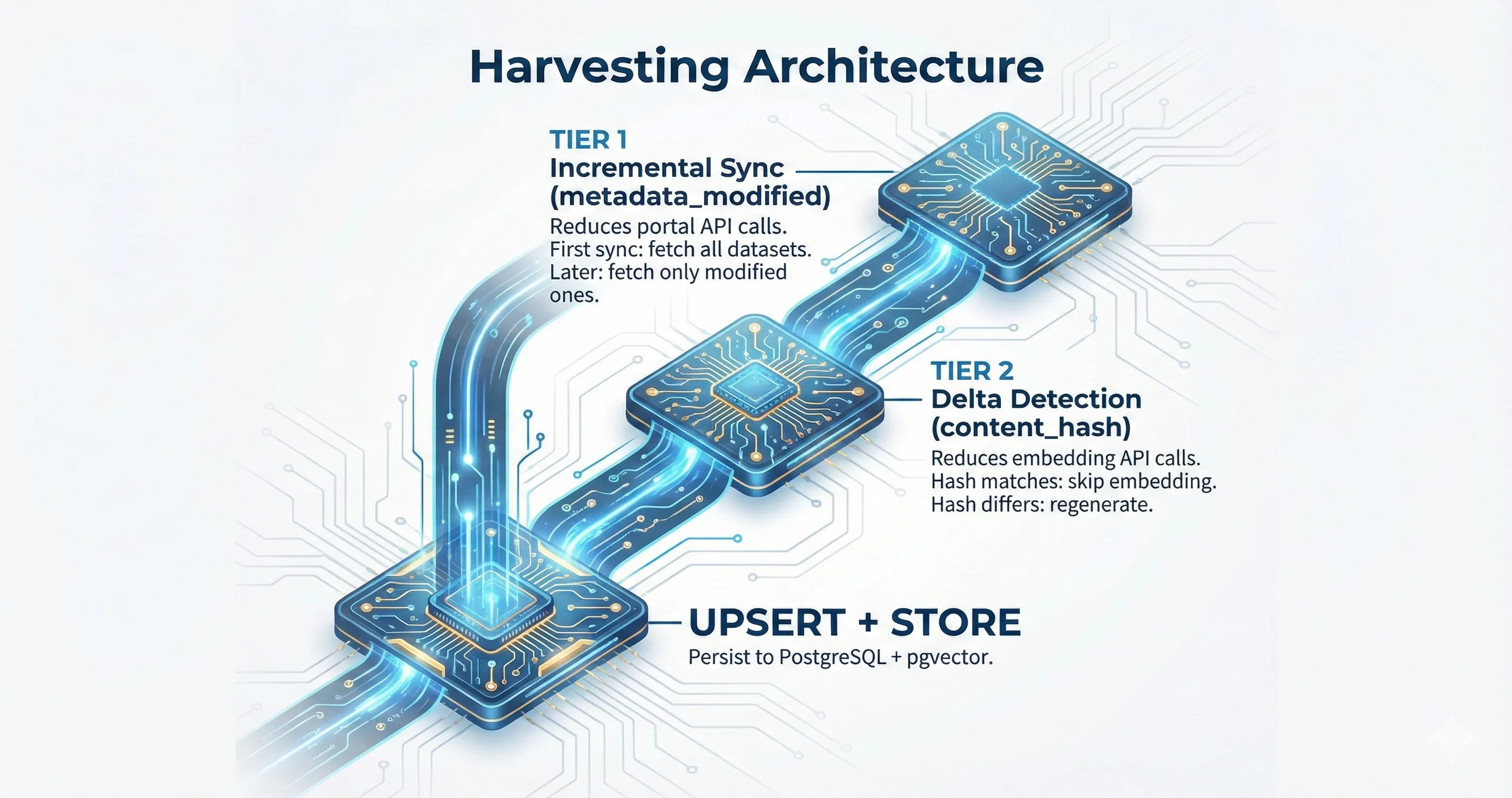
Incremental sync reduces portal calls. Delta detection reduces optional embedding work.
Streaming Pipeline
Section titled “Streaming Pipeline”The harvest pipeline streams datasets through processing stages instead of loading an entire catalog into memory. That keeps memory bounded even on very large portals.
Embedding is no longer part of the mandatory hot path. When enabled, it runs through a separate service and can batch texts according to provider capabilities.
Batch Harvesting
Section titled “Batch Harvesting”Run ceres harvest --metadata-only without a URL or --portal to refresh every
enabled entry in portals.toml. Portal failures are isolated, so the run
continues and emits a final per-portal summary with status, dataset counts,
duration, and a stable error class.
Portal-level concurrency is bounded to four by default. Override it with
--concurrency N or CERES_BATCH_CONCURRENCY=N; per-portal paging and retry
behavior remains unchanged.
Scheduled runs can set CERES_LOG_FORMAT=json for newline-delimited
portal_outcome, batch_summary, and fatal events. Exit 0 means all
portals succeeded, 2 means the batch completed with portal failures, and 1
means the command failed before or outside the recoverable per-portal loop.
Tier 1: Incremental Sync
Section titled “Tier 1: Incremental Sync”When a portal supports modified-since querying, Ceres fetches only datasets changed since the last successful sync. The last sync timestamp is stored in portal_sync_status.
On the first sync for a portal, or when --full-sync is passed, Ceres performs a full sync. If incremental sync is unsupported or fails, the service falls back to a full sync automatically.
This is what keeps repeated harvests operationally cheap.
Tier 2: Delta Detection
Section titled “Tier 2: Delta Detection”Even when a dataset is fetched, its embeddable content may not have changed. A portal can update tags, resources, or minor metadata without changing the text that would be embedded.
Delta detection computes a SHA-256 hash of title + description (the content_hash) and compares it against the stored hash. If the hash matches, the record is skipped.
The hash gates the metadata upsert. A fetched record whose title and description are unchanged is counted as Unchanged and its row is not rewritten, so a change limited to tags, license, resources, or other metadata does not reach the stored row. --full-sync does not change this. To refresh that metadata, clear content_hash for the affected rows before harvesting.
This matters most when you run the optional embedding stage, whether locally through Ollama or through a hosted provider.
Why Both Tiers Are Necessary
Section titled “Why Both Tiers Are Necessary”| Scenario | metadata_modified changed? |
content_hash changed? |
Action |
|---|---|---|---|
| Tag added to dataset | Yes | No | Fetched, not written (stored tags stay stale) |
| Resource URL updated | Yes | No | Fetched, not written (stored resources stay stale) |
| Title rewritten | Yes | Yes | Metadata rewritten; an existing embedding is kept |
| New dataset published | N/A (new) | N/A (new) | Fetch metadata, mark for embedding |
| Nothing changed | No | N/A (not fetched) | Not fetched at all |
Without incremental sync, every run would fetch the full portal. Without delta detection, every changed record would be re-embedded even when the relevant text stayed the same.
Sync Outcomes
Section titled “Sync Outcomes”Each dataset processed during a sync receives one of these outcomes:
| Outcome | Meaning | Embedding generated? |
|---|---|---|
Created |
New dataset, not seen before | Marked pending |
Updated |
Content hash changed (title or description modified) | Only if the row has no embedding yet; an existing one is kept |
Unchanged |
Content hash matches stored value; row not rewritten | No |
Failed |
Error during processing | No |
Skipped |
Embedding step was skipped or the circuit breaker is open | No |
These are tracked via SyncStats and reported at the end of each sync operation.
CLI Flags
Section titled “CLI Flags”| Flag | Tier 1 (Incremental) | Tier 2 (Delta Detection) | Use case |
|---|---|---|---|
| (none) | Incremental if previous sync exists | Always active | Normal operation |
--full-sync |
Full sync forced | Still active | Re-scan portal after known issues |
--dry-run |
Dry run (no writes) | Still active | Preview what would happen |
--metadata-only |
Same as default | Still active (no embedding) | Harvest without API key |
Delta detection is always active regardless of flags. There is no flag to bypass it. To refresh metadata, delete the affected content hashes from the database. To re-embed, also clear the stored embeddings and run ceres embed.
Metadata-only mode is the normal harvest path
Section titled “Metadata-only mode is the normal harvest path”--metadata-only is not a degraded mode. It is the cleanest way to operate Ceres when your immediate goal is harvesting and synchronization.
Use it when you want to:
- build the catalog before choosing an embedding provider
- run fully locally without any vector generation
- separate crawl operations from search operations
- backfill vectors later with
ceres embed
Database Tracking
Section titled “Database Tracking”The portal_sync_status table tracks sync history per portal:
| Column | Type | Purpose |
|---|---|---|
portal_url |
VARCHAR (PK) |
Portal identifier |
last_successful_sync |
TIMESTAMPTZ |
Timestamp used for next incremental sync |
last_sync_mode |
VARCHAR(20) |
"full" or "incremental" |
sync_status |
VARCHAR(20) |
"completed" or "cancelled" |
datasets_synced |
INTEGER |
Number of datasets processed |
updated_at |
TIMESTAMPTZ |
When this record was last updated |
The last_successful_sync value is set to the sync start time (not end time), ensuring no datasets are missed between syncs.
Content hashes are stored in the datasets table in the content_hash column (VARCHAR(64), nullable for backward compatibility with records indexed before delta detection was added).
Optional embedding stage
Section titled “Optional embedding stage”Embeddings are processed later by EmbeddingService:
HarvestServicewrites datasets and tracks changesEmbeddingServicereads pending rows and generates vectorsHarvestPipelinecomposes both when you want the combined workflow
This split lets you harvest regardless of embedding availability and makes Ollama a practical local-first default.
Circuit Breaker
Section titled “Circuit Breaker”When embeddings are enabled, the embedding provider is protected by a circuit breaker to avoid cascading failures:
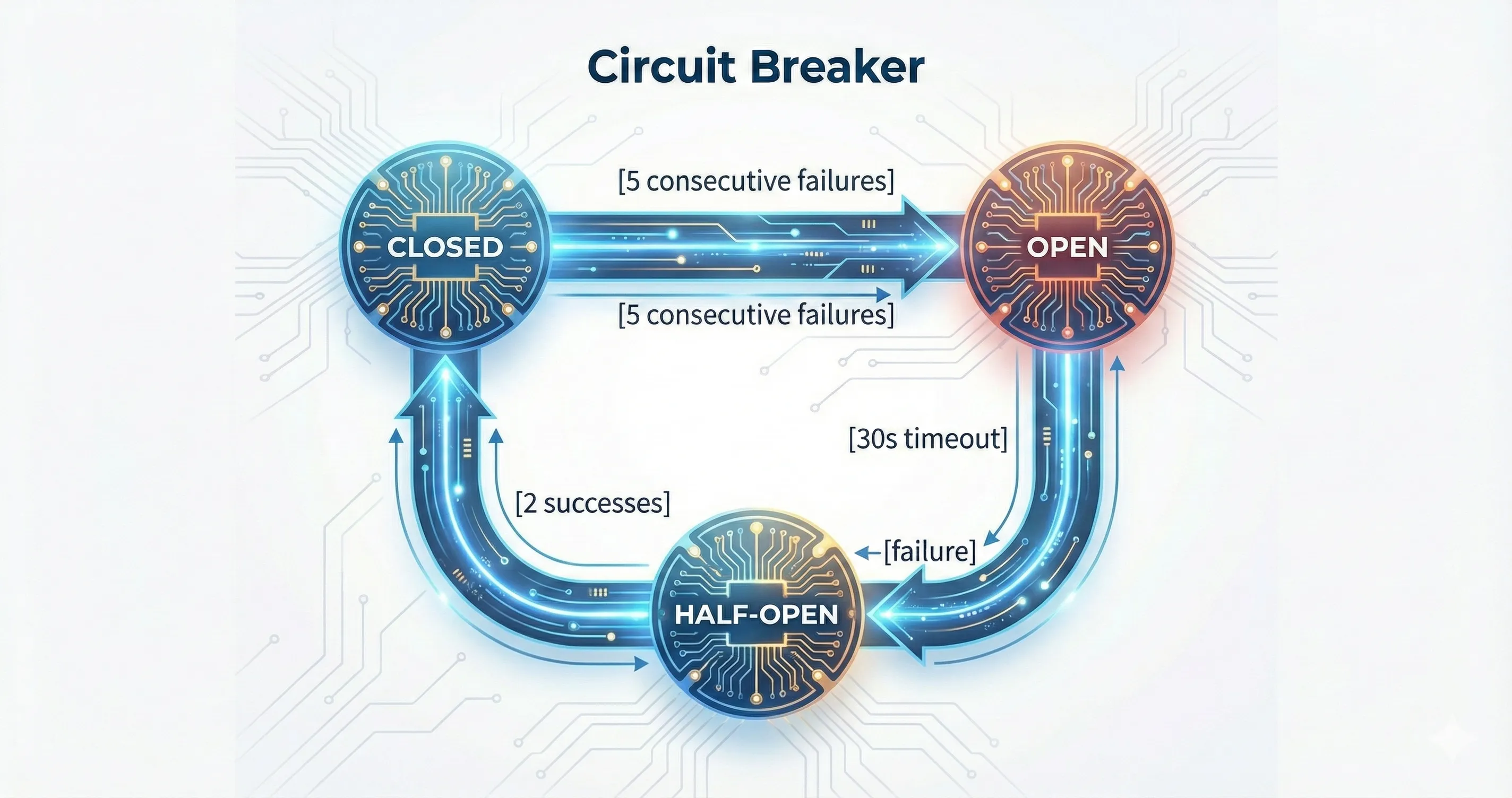
Closed, Open, Half-Open states with adaptive recovery timeout on rate limits.
- Closed: requests flow normally
- Open: all embedding requests are rejected immediately, datasets are recorded as
Skipped - Half-Open: requests are allowed to probe recovery; 2 successes close the circuit, any failure reopens it
On HTTP 429, the recovery timeout is multiplied by a backoff factor, up to a configured maximum.
Stale Dataset Detection
Section titled “Stale Dataset Detection”After a successful full sync with zero failures and zero skipped datasets, Ceres marks datasets that no longer exist on the portal as stale. This uses an efficient exclusion-based approach: all datasets whose original_id is NOT in the set of IDs seen during the sync are marked is_stale = TRUE.
Stale datasets are:
- Excluded from semantic search (
WHERE NOT is_stale) - Excluded from pending embeddings (via partial index)
- Not deleted — soft-marked so they can be recovered if the portal re-publishes them
Stale detection only runs on full syncs because incremental syncs fetch only modified datasets and cannot definitively determine which datasets have been removed.
Protocol-specific behavior
Section titled “Protocol-specific behavior”The exact harvest behavior depends on the portal client:
- CKAN clients can use modified-since filters and adaptive page sizing
- DCAT udata clients stream paginated JSON-LD catalog pages and resolve multilingual fields according to the configured language
- SPARQL DCAT clients use publisher-bounded pages, with a keyset cursor for
data.europa.eu, and deduplicate by dataset URI. Dataset metadata and distributions are fetched in separate boundedVALUESphases, preserving resource title, format, media type, and download/access URL without multiplying the pagination query. Localized titles/descriptions follow the configured language preference (requested language > sibling language > English > untagged).
Adaptive Page Size
Section titled “Adaptive Page Size”The CKAN client uses adaptive page size reduction to handle portals that truncate or timeout on large responses:
- Initial page size: 1000 rows
- On Timeout or NetworkError: quarters the page size (1000 → 250 → 62 → 15 → 10)
- Minimum page size: 10 rows
- On other errors (rate limits, client errors): no reduction, error propagated normally
This converges faster than halving and handles portals with resource-heavy datasets at specific offsets.
HTTP behaviour can be tuned with environment variables (defaults shown):
CERES_HTTP_TIMEOUT_SECS=60 # base per-request timeout; raise it for very slow portalsCERES_HTTP_MAX_RETRIES=3 # attempts for transient errorsCERES_HTTP_RETRY_BASE_MS=500 # base backoff delayNot every client reads them. CKAN, Socrata, OpenDataSoft and ArcGIS Hub use all three. DCAT udata REST and SPARQL use the retry settings with fixed request timeouts of 90 and 300 seconds. data.json, OGC CSW, STAC and SDMX use fixed timeouts; data.json and CSW retry on their own schedule, STAC and SDMX do not retry.
Related Source Files
Section titled “Related Source Files”- Harvesting service:
crates/ceres-core/src/harvest.rs - Embedding service:
crates/ceres-core/src/embedding.rs - Harvest pipeline:
crates/ceres-core/src/pipeline.rs - Delta detection logic:
crates/ceres-core/src/sync.rs(needs_reprocessingfunction) - Content hash computation:
crates/ceres-core/src/models.rs(NewDataset::compute_content_hash) - Circuit breaker:
crates/ceres-core/src/circuit_breaker.rs - CKAN client:
crates/ceres-client/src/ckan.rs(search_modified_since, adaptive page size) - DCAT client:
crates/ceres-client/src/dcat.rs - SPARQL DCAT client:
crates/ceres-client/src/sparql.rs - Project Open Data client:
crates/ceres-client/src/datajson.rs - DB schema:
migrations/